DocSupra › IRS upload size limit
IRS document upload: the size limit and what it accepts
DocSupraCompliance Studio
Fix this file now
Drop the document here: it opens in the Compliance Studio already set for IRS document uploads. Nothing is uploaded.
Your browser reads the file on this device: DocSupra never uploads it. You see the finished file before you pay; paying is only for the download. Terms · Privacy
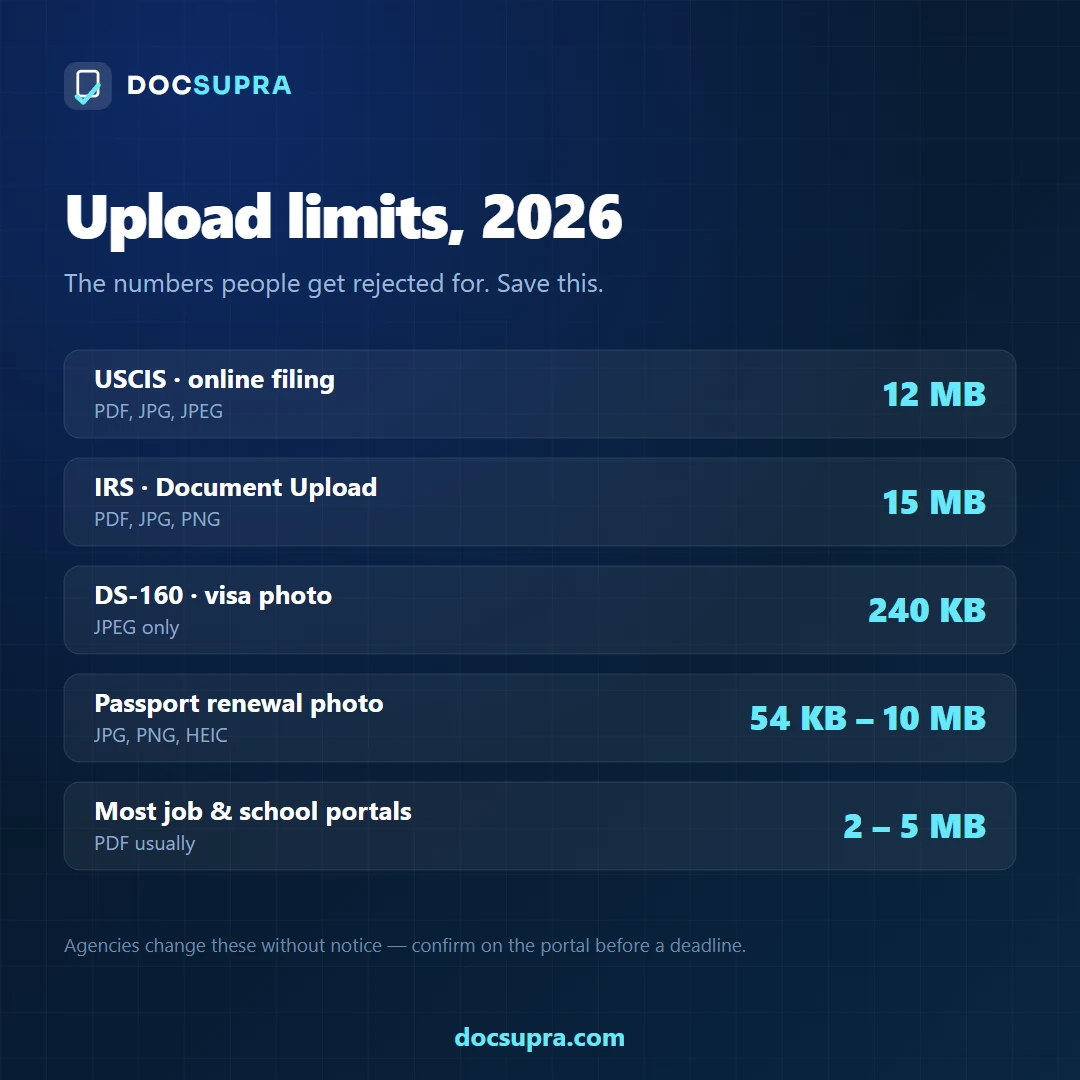
The short answer. The IRS Document Upload Tool commonly accepts up to 15 MB per file, with a limited number of files per submission, in PDF, JPG, JPEG and PNG. Files must not be password-protected or encrypted.
The IRS Document Upload Tool has a different cap from USCIS, which trips people who have used both. Here are the numbers, and the three reasons a submission comes back.
The limits
| What | Limit |
|---|---|
| Maximum size per file | 15 MB |
| Files per submission | Typically up to 40 |
| Accepted formats | PDF, JPG, JPEG, PNG |
| Password protection | Not permitted |
| Recommended resolution | 300 DPI for scanned pages |
Checked against the published IRS guidance in August 2026. The IRS changes these without notice — confirm on the IRS Document Upload Tool itself before a deadline.
Why a submission comes back
The file is over 15 MB
Photographing four pages of a notice on a modern phone puts you past 15 MB before you have added anything. Reducing to 300 DPI and using bitonal for typed pages usually cuts 90% without touching legibility.
The reference number is missing
The IRS Document Upload Tool ties your upload to a specific letter or notice. Uploading correct documents against the wrong reference is a filing failure that has nothing to do with the file itself, and it is common.
The page is not readable
An IRS reviewer reads figures. A shadow across a column of numbers, or glare over a total, will draw a follow-up letter even when your documentation is complete.
15 MB at the IRS, 12 MB at USCIS. There is no shared federal standard. A file prepared for one is not automatically fine for the other, and the DS-160 photo is stricter than both at 240 KB.
Get your response under the IRS 15 MB cap
Runs in your browser. Your document is never uploaded. See the finished result before you pay.
Open DocSupraYour W-2 is one page. Why is the file 22 MB?
The short answer. The IRS Document Upload Tool accepts 15 MB per file — verified August 2026 — in JPEG, PNG or PDF, up to 40 files per submission. A modern phone photographs a single sheet of paper at 12 megapixels in full colour, which lands between 8 and 25 MB before you have done anything wrong. The document is fine. The camera was simply generous.
Nobody photographs a W-2 expecting a file-size problem. It is one page of black text on white paper — the least demanding thing a camera will ever be pointed at. The size comes from what the phone records around the text, not from the text.
The 5 reasons, in plain words
- The colour it does not need. A W-2 is black ink on white stock. Your phone stored twelve million pixels of full colour anyway, including the wood grain of the table underneath.
- The sensor noise. Indoor light makes a phone raise its sensitivity, and that speckle across the white areas is detail as far as the encoder is concerned — it stores every dot.
- The shadow of your own hand. A gradient across the page is more data to encode than a flat white field. The darker half of the sheet costs bytes that carry nothing.
- HEIC converted badly. iPhones shoot HEIC. Some conversion paths expand it to a lossless PNG on the way out, which can triple the size of a document that has only two real colours.
- Forty files, one limit each. The 15 MB cap is per file, not per submission — you may send up to 40. If you are sending a return with attachments, each one has its own budget.
Which of them can software fix?
All five. Flattening the lighting removes the gradient, the tone curve collapses the paper to a clean white without touching the ink, and the encoder then targets the exact size you ask for. A 22 MB photograph of a W-2 becomes a 600 KB PDF at 300 DPI with every digit still readable — and it runs in this browser, so the form with your social security number on it never leaves your machine.
Your 1099 or 1040 will not upload. The cap is 15 MB and a phone photo beats it.
The short answer. The IRS Document Upload Tool accepts 15 MB per file, in PDF, JPG, JPEG or PNG. A return photographed page by page on a phone routinely lands at 30–60 MB. The trap is that the obvious fix — compressing hard — turns the figures to mush, and a tax document with an unreadable number is worse than one that is too big.
It is the night before the deadline, the bar fills, and then it tells you the file is too large. Every compressor you find wants you to upload the return carrying your Social Security number to their server first.
The 5 reasons, in plain words
- Over 15 MB. Each photographed page is 4–8 MB. Four pages and you are already past the limit.
- The figures break when compressed. A generic compressor lowers JPEG quality until the size fits. Below roughly 0.6 quality the thin strokes of digits come apart — an 8 reads as a 3, and a reviewer cannot confirm an amount.
- Wrong format. The IRS Document Upload Tool takes PDF, JPG, JPEG and PNG. HEIC — what every recent iPhone shoots by default — is not on the list.
- Pages sent as separate files. Some notices want one document. Four loose photos are four uploads, and some portals accept only one.
- A shadow across the numbers. The most expensive kind of illegible: nothing is technically wrong with the file, and the return still goes to manual review.
Which of them can software fix?
For a tax form the right trade is fewer pixels, never lower quality. A page at 1400 px and quality 0.75 is readable; the same page at 1844 px and quality 0.29 is not. That is the order this software works in, it refuses to drop below a legibility floor, and your return never leaves your computer while it happens — there is no upload endpoint to send it to.
Related
Doing this for clients, not for yourself? DocSupra for teams adds the batch queue, one combined PDF per matter and a dated compliance report — still with nothing uploaded.
What it costs
See the finished file first — sharp on screen, 100% with the lens, no card and no account.
Prices are in USD and exclude any tax that applies in your country; Stripe calculates it and shows it before you pay.
See the full comparison →